
Loading app
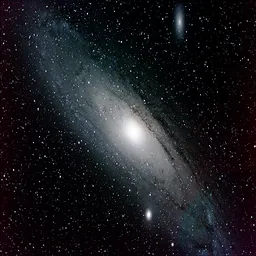
This app enables you to engage in astrophotography using your smartphone. Capture stunning images of the night sky with long exposure times, similar to traditional techniques used with DSLRs and CCD/CMOS cameras. By utilizing RAW format, you can create high-quality images that can later be processed with stacking software.
DeepSkyCamera caters specifically to astronomers and astrophotography enthusiasts. It requires a solid understanding of astrophotography principles and familiarity with RAW files. This app is ideal for those serious about capturing celestial images and may need additional equipment, such as a telescope.
Manually control exposure time and ISO settings to optimize conditions for astrophotography. Depending on your smartphone model, the maximum ISO can vary, with some devices reaching up to 12,800. While you can set exposure times, most devices limit this to 30 seconds due to sensor constraints.
The app allows you to capture different types of frames essential for astrophotography, including light, flats, bias, and dark frames. This feature mimics traditional cameras, enabling you to gather necessary data for post-processing. After capturing the images, you can utilize external software for stacking and refining your results.
DeepSkyCamera provides both automatic and manual focusing options. It can automatically focus to infinity or hyperfocal distances, while also allowing manual adjustments for precise control. This flexibility is crucial for achieving sharp images of distant celestial objects.
DeepSkyCamera is compatible with phones and tablets that support RAW image capture and manual settings. High-end models like the Samsung S series and various LG devices are recommended.
Yes, the app can function offline. However, you may need internet access for downloading additional processing software.
You can capture light, flats, bias, and dark frames, which are essential components of astrophotography.
Yes, a detailed manual is available online to help you understand how to use the app effectively.
Support for Huawei Pura 80 models; bug fix for Google Pixel 7 - 10: session stopped after the 63rd frame has been resolved; Oppo A38: 32s max exposure time; Bug fix for Oppo A52, realme P4x, realme 12 Pro Plus, realme C3: devices had a long pause between two images, fixed; Bug fix for Samsung A35: 45s max exposure time from Android 16; Bug fix for Motorola G57 Power, Moto G 5G (2023), Moto G Stylus 5G (2024), Samsung S22/SM-S9010, Samsung M35, A35; Adaptation to Android 17/API Level 37
Released Jun 8, 2026
Not sure what a permission allows? Learn what these mean.

Remove and swap backgrounds in your photos and remove unwanted objects

AI video editor with music! Edit video with effects, slideshow & slow motion

Perfect selfies every time. Auto-beautification for that flawless look.


