
Loading app
Transform your photos with YouCam Perfect, a powerful AI photo editor and beauty cam. This app enables you to retouch images, enhance selfies, and create stunning collages in just a few taps. With a user-friendly interface, it caters to anyone looking to elevate their photography skills, whether for social media or personal use.
Improving your images is simple with the AI Photo Enhance feature. This tool boosts clarity and sharpness, providing professional-quality results with minimal effort. Both casual users and content creators will find this capability invaluable for producing high-quality visuals.
Need to eliminate distractions from your photos? The AI Object Remover feature allows you to erase unwanted elements seamlessly. Whether it's a stray person in a group shot or an object spoiling a beautiful landscape, this tool delivers clear, polished images ready for sharing.
Crafting collages is straightforward with the Collage Maker, offering over 100 customizable templates. You can easily choose grids or freestyle layouts, add stickers, and personalize your collages. This feature is perfect for showcasing memories or special events.
Selfies receive significant improvements through the app's beauty features. With just one tap, you can smooth your skin, whiten teeth, and remove blemishes. Makeup options also let you apply virtual lipstick and blush, enhancing your overall look before sharing.
Creating group photos is easy with the AI Group Photo feature. You simply upload two photos, and the app merges them into a realistic group image. This makes it perfect for capturing moments with friends or family, with themed templates available for special occasions.
YouCam Perfect is free to download and use, with in-app purchases available for extended features. The app requires permissions for camera access, storage, and location services, enabling you to take photos, save creations, and utilize location-based templates.
Yes, YouCam Perfect is free to download and use, but it offers in-app purchases for additional features.
This app supports Android phones, tablets, and Chromebooks, allowing for versatile usage across devices.
Some features may require an internet connection, but basic photo editing tools can be accessed offline.
Yes, the app includes a collage maker with more than 100 templates for creating personalized collages.
The AI Object Remover uses advanced algorithms to accurately erase unwanted elements from your photos, providing a clean result.
We’ve refreshed the app with powerful AI tools for faster, easier photo editing! ✨ AI Facelift - Sculpt and contour features for a naturally youthful look. Redness Removal - Smooth away redness and uneven skin tones for a flawless complexion in seconds. Lip Plumper - Create fuller, more defined lips with a natural-looking boost. Create flawless photos in just a tap!
Released Jul 26, 2026
Not sure what a permission allows? Learn what these mean.

Perfect your snaps with all-in-one hairstyle try on, makeup, face & body editor!
Perfect Body Editor, Face Retouch App, AI Photo Enhancer & Pic Collage Maker
One-tap remove objects, logos, text & more with AI Retouch photo editor & eraser
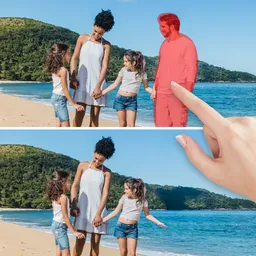
Remove object, remove background and enhance photo quality with AI photo editor.